
Introduction
Ever searched for something nearby? Like “dentist near me” or “best pizza in New York”? Google Maps shows you the closest options. If your business doesn’t pop up there, you’re missing out on local customers. That’s where Google Maps SEO comes in. By tuning up your listing, you get seen more, attract more leads, and yes, make more sales.
What Is Google Maps SEO?
It’s all about making your Google Business Profile and online presence stand out in local searches. When done right, you rank higher on Google Maps and local search results. The result? More nearby customers find you.
Why Bother with Google Maps SEO?
- Almost half of Google searches are local.
- More than three-quarters of people who search on their phones visit a related business within a day.
- Being in the top three Google Maps listings—called the “Local 3-Pack”—means way more clicks.
- If you don’t optimize, your competitors take the spotlight, and customers might never find you.
How Does Google Decide Who Shows Up?
Google looks at three things:
- Relevance: How well your business matches what someone’s searching for.
- Distance: How close you are to the person searching.
- Prominence: How well-known and trusted you are—reviews, links, mentions, and more.
To get ahead, you need to improve all three.
Easy Ways to Boost Your Google Maps SEO

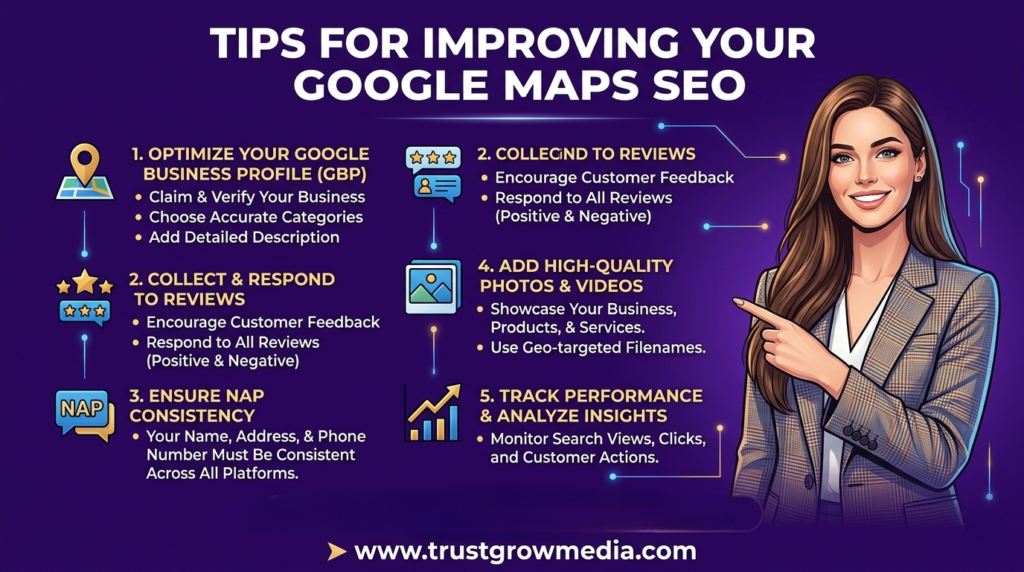
1. Make Your Google Business Profile Shine
- Use your exact business name—no keyword stuffing.
- Keep your Name, Address, and Phone number (NAP) accurate.
- Pick the right business categories.
- Add a clear, keyword-friendly description.
- Upload good photos and videos.
2. Keep Your Info Consistent Everywhere
Google checks if your business details match across your website, directories, and social media. Even small differences confuse the system.
3. Get And Reply To Google Reviews
Reviews build trust and make your business look popular. Ask happy customers for reviews, and always respond—good or bad. The more positive reviews you have, the better you rank.
4. Use Local Keywords
Add phrases like “plumber in Miami” or “best bakery in Chicago” in your description and posts. This helps Google match you with local searches.
5. Share New Photos Regularly
Businesses with photos get a lot more clicks and directions requests. Think of it like fresh window displays that invite people in.
6. Post Updates Often
Treat your profile like a social feed. Share news, offers, or events to stay active and visible.
7. Build Local Citations
Citations are mentions of your business on sites like Yelp or Yellow Pages. The more consistent these are, the more Google trusts you.
8. Write Local Content On Your Website
Blog about things locals search for. For example:
- “Best coffee shops in Austin, TX”
- “How to pick a wedding photographer in San Diego.”
This helps you show up in local search results and attract more visitors.
9. Embed Google Maps On Your Site
Adding a map of your location on your contact page signals to Google that you’re a local business.
10. Make Sure Your Site Works On Mobile
Most local searches happen on phones. Your website needs to be fast, easy to use, and look good on any device.
11. Get Local Backlinks
Partner with local bloggers, chambers of commerce, or news sites. Links from these sources boost your reputation.
12. Use The Q&a Section On Your Profile
Answer common questions before people ask. It builds trust and keeps your profile engaging.
Watch Out for These Common Mistakes
- Using fake addresses or P.O. Boxes.
- Keyword stuffing your business name.
- Ignoring negative reviews.
- Not updating holiday hours.
- Forgetting to make your site mobile-friendly.
How Long Until You See Results?
SEO isn’t instant. Usually, you’ll see progress in 6 to 12 weeks if you stick with it. If your market is super competitive, it might take longer. The key? Patience and consistency.
Wrap-Up
Google Maps SEO is a must for local businesses. Optimizing your profile, gathering reviews, and keeping info consistent can help you rank higher and bring in more customers. Start small. Keep at it. You’ll notice your visibility growing over time.
FAQs
1. What Exactly Is Google Maps Seo?
It’s making your Google Business Profile and online presence better so you show up higher in local search results and on Google Maps.
2. How Do I Get More Google Reviews?
Just ask! Reach out to happy customers, send follow-up emails, and make it easy with a direct review link. Keep asking regularly for steady results.
3. Do Negative Reviews Hurt My Ranking?
They can if you ignore them. But if you respond politely and keep getting positive reviews, you can balance things out.
4. Can Small Businesses Compete With Big Brands On Google Maps?
Absolutely. With the right local content, citations, reviews, and an optimized profile, small businesses can outrank even big chains in their area.
5. How Often Should I Update My Google Business Profile?
At least once a month. Posting updates, adding photos, and answering questions shows Google you’re active and relevant.